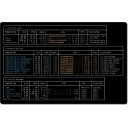
spec-watcher is a full-screen terminal dashboard that continuously watches a repository's docs/specs folder and shows every spec's name, status, and task progress in one live, navigable table. It adds a per-spec detail view, drift/attention flags, local git branch awareness, and a headless JSON/Markdown mode for CI. Specs can be edited in place: tick tasks off and change a spec's status from the detail view. It tracks drift, flagging a spec marked Complete with tasks outstanding, or one whose tasks are all done but whose status has not caught up.
Yes. spec-watcher is free and open-source software released under the MIT license.
What is the latest version of spec-watcher?
The latest version is 1.1.0, released on Aug 24, 2026.
Is it safe to download spec-watcher?
The download button links to the official installer published on github.com, the same file Windows Package Manager installs. You can verify the downloaded file by comparing its SHA-256 checksum with 9c704cdc3011f8f18750af3cdf2b0cd6c275382c23440b679cdd39ecf28bd19d.
Which Windows versions does spec-watcher support?
spec-watcher runs on Windows and is available for 64-bit (x64), ARM64 systems.
How do I uninstall spec-watcher?
Open Settings › Apps › Installed apps, find spec-watcher and select Uninstall. From the command line, run winget uninstall --id=UsualExpat.SpecWatcher -e.
Is there a portable version of spec-watcher?
Yes. spec-watcher is available as a portable ZIP archive (spec-watcher-1.1.0-win-x64.zip, 64-bit (x64)) that runs without installation. Copy it to any folder or USB drive and run it from there.
Alternatives to spec-watcher
Other Command Line Tools programs for Windows from different developers.