About The Desktop Watchmaker Widget
The Desktop Watchmaker Widget - View WatchMaker watches on your Desktop
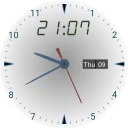
Display WatchMaker watch faces on your desktop

 Download for Windows
The Desktop Watchmaker Widget - View WatchMaker watches on your Desktop
Display WatchMaker watch faces on your desktop
| Publisher | Japplis |
|---|---|
| Author | Anthony Goubard |
| Version | 1.4 |
| License | Commercial |
| Installer type | inno |
| Architecture | x64 |
| Package ID | Japplis.DesktopWatchmaker.Widget |
| Install scope | All users |
winget install --id=Japplis.DesktopWatchmaker.Widget -ewinget upgrade --id=Japplis.DesktopWatchmaker.Widget -ewinget uninstall --id=Japplis.DesktopWatchmaker.Widget -e"DesktopWatchmakerWidget-1.4.exe" /VERYSILENT /SUPPRESSMSGBOXES /NORESTART /SP- /ALLUSERSNo, The Desktop Watchmaker Widget is paid software from Japplis.
The latest version is 1.4.
The download button links to the official installer published on japplis.com, the same file Windows Package Manager installs. You can verify the downloaded file by comparing its SHA-256 checksum with da45437cb6d9c26122d56dca1435c2a470ce4faf69edb7db1aa2b28b0585ab4b.
The Desktop Watchmaker Widget runs on Windows and is available for 64-bit (x64) systems.
Run the offline installer with "DesktopWatchmakerWidget-1.4.exe" /VERYSILENT /SUPPRESSMSGBOXES /NORESTART /SP- /ALLUSERS, or install it with Windows Package Manager: winget install --id=Japplis.DesktopWatchmaker.Widget -e --silent.
Open Settings › Apps › Installed apps, find The Desktop Watchmaker Widget and select Uninstall. From the command line, run winget uninstall --id=Japplis.DesktopWatchmaker.Widget -e.
Other Themes programs for Windows from different developers.

A lightweight utility that makes the Windows taskbar translucent/transparent.

Zebar creates cross-platform taskbars, desktop widgets, and popups.

Sucrose is a versatile wallpaper engine that brings life to your desktop with a wide range of interactive wallpapers.

Always-on desktop HUD for your AI dev stack

Lightweight live-wallpaper app that pins clocks, weather, PC monitors and more behind your desktop icons

Claude Code limits, Fable cap and session context in the Windows taskbar

Create beautiful text for your presentations and thumbnails

Powerful file manager for developers

Personal file manager with tabs support

Decoration is an image editor to add nice borders and effects to photos.