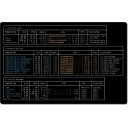
VibeArk is a terminal-based portable application manager for Windows x64. Download, install, and update popular portable apps with a single keystroke. Features include multi-source downloads, proxy support, GitHub acceleration, Sigstore-signed releases, and bilingual (Chinese/English) UI — optimized for China's network environment.
Technical details
Publisher
Elwina Vardal
Version
1.0.0
License
MIT
Installer type
portable
Architecture
x64
Package ID
Elwina.VibeArk
Install VibeArk from the command line
Install with Windows Package Manager
winget install --id=Elwina.VibeArk -e
Update to the latest version
winget upgrade --id=Elwina.VibeArk -e
Uninstall
winget uninstall --id=Elwina.VibeArk -e
VibeArk adds this command to the command line: vibeark.
Yes. VibeArk is free and open-source software released under the MIT license.
What is the latest version of VibeArk?
The latest version is 1.0.0.
Is it safe to download VibeArk?
The download button links to the official installer published on github.com, the same file Windows Package Manager installs. You can verify the downloaded file by comparing its SHA-256 checksum with d705cafc9d69260763d3c5969c3b76f516da6747e7451b6319ac44e2617fb88b.
Which Windows versions does VibeArk support?
VibeArk runs on Windows and is available for 64-bit (x64) systems.
How do I uninstall VibeArk?
Open Settings › Apps › Installed apps, find VibeArk and select Uninstall. From the command line, run winget uninstall --id=Elwina.VibeArk -e.
Is there a portable version of VibeArk?
Yes. VibeArk is available as a portable program (vibeark.exe, 64-bit (x64)) that runs without installation. Copy it to any folder or USB drive and run it from there.
Alternatives to VibeArk
Other Command Line Tools programs for Windows from different developers.