About QWERTY-fr
QWERTY-fr is a keyboard layout based on QWERTY with extra symbols and
diacritics so that typing both French and English is easy and fast.

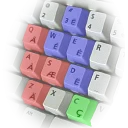
QWERTY keyboard layout with extra symbols and diacritics for French.
QWERTY-fr is a keyboard layout based on QWERTY with extra symbols and
diacritics so that typing both French and English is easy and fast.
| Publisher | Julien Blitte |
|---|---|
| Author | qwerty-fr contributors |
| Version | 1.0.3.40 |
| Release date | 2023-12-10 |
| License | MIT |
| Installer type | zip |
| Architecture | x64 |
| Package ID | qwerty-fr.qwerty-fr |
| Admin rights | Required |
| Install scope | All users |
winget install --id=qwerty-fr.qwerty-fr -ewinget upgrade --id=qwerty-fr.qwerty-fr -ewinget uninstall --id=qwerty-fr.qwerty-fr -emsiexec /x {8893AC91-4AC0-4EFB-BA90-F196F51297BA} /quietYes. QWERTY-fr is free and open-source software released under the MIT license.
The latest version is 1.0.3.40, released on Dec 10, 2023.
The download button links to the official installer published on github.com, the same file Windows Package Manager installs. You can verify the downloaded file by comparing its SHA-256 checksum with 28d4d20e9669a6f532ecfbf80bb86122b6db2b325d9f8f68d4576eb5fcc888e8.
QWERTY-fr runs on Windows and is available for 64-bit (x64) systems.
Open Settings › Apps › Installed apps, find QWERTY-fr and select Uninstall. From the command line, run winget uninstall --id=qwerty-fr.qwerty-fr -e.
Other Keyboards programs for Windows from different developers.

A tray toolkit for your keyboard and desktop: the live layout at the caret, one-key fixes for wrong-layout text, screen capture and optional text tools.

A smart automatic keyboard layout switcher.

An improved French AZERTY keyboard layout that preserves your existing habits.
Remaps your keyboard to a more comfortable layout, also when programming
The European Keyboard Layout

Workman keyboard layout