
Legacy media playback tool
Windows Media Player is a free built-in multimedia software for Windows operating systems that provides playback support for a variety of audio and video file types. Designed originally in 1991, it comes pre-installed on most Windows versions, including Windows 10, with optional availability for Windows 11 users.
Windows Media Player allows you to play, organize, and manage media libraries, burn CDs, and rip audio discs. Supported platforms include desktop systems running Windows XP and later. The tool supports common file formats such as MP3, WMV, WMA, AVI, and MPEG, offering basic media control features and playlist functions for organizing playback.
Windows Media Player supports key audio and video formats, including MP3, WAV, WMA, AVI, WMV, and MPEG. It includes basic playback functions such as play, pause, stop, seek, and volume control. You can organize files into playlists and sort your library by artist, album, genre, or other metadata. It offers CD ripping and burning capabilities. However, the player lacks support for modern codec standards and subtitle formats.
Classic player
It runs on Windows XP, Vista, 7, 8, 10, and is optionally available on Windows 11 via Microsoft’s legacy components. It requires low system resources and functions adequately on older hardware. Performance is generally stable for basic media playback tasks, but users can potentially encounter limitations with unsupported codecs or high-resolution video formats. The lack of hardware acceleration can also affect video playback on certain systems.
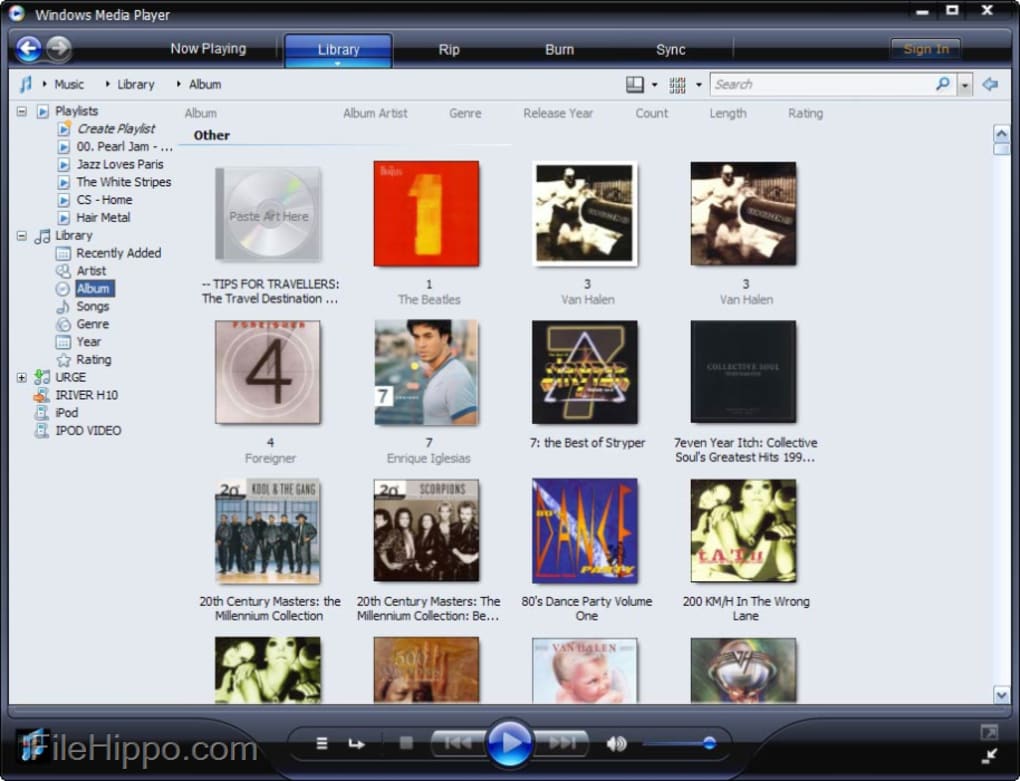
The user interface is structured around a tabbed layout with options such as Now Playing, Library, Rip, Burn, and Sync. The interface remains largely unchanged since older Windows versions, which feels outdated. Customization is minimal, with limited skin and layout options. It includes a basic media library manager that allows you to edit metadata, create playlists, and sync files to external devices. Search functions are available for navigating large collections.
Pros
- Pre-installed on most Windows versions
- Supports basic file formats like MP3, WMV, AVI
- Includes CD ripping and burning tools
- Low resource requirements
Cons
- Outdated user interface and design
- Limited subtitle and codec support
- Lacks support for subtitle formats
- No hardware acceleration for video