Versatile and community-Driven media player
VLC Media Player is a highly capable multimedia application that enables users to play, manage, and stream a wide variety of audio and video formats. It supports industry-standard formats such as MP4, MP3, MKV, FLAC, AVI, and OGG—all without requiring additional codec packs. Its built-in decoding capabilities make it a practical, go-to solution for users working with both common and open formats.
One of VLC’s most valued features is its extensive codec support, powered by integrated libraries like FFmpeg. The player can handle a broad array of formats natively and is especially effective at playing media files that are partially downloaded, corrupted, or incomplete—useful for previewing or salvaging damaged content.
Robust codec support and fault-tolerant playback
Functional interface with customization options
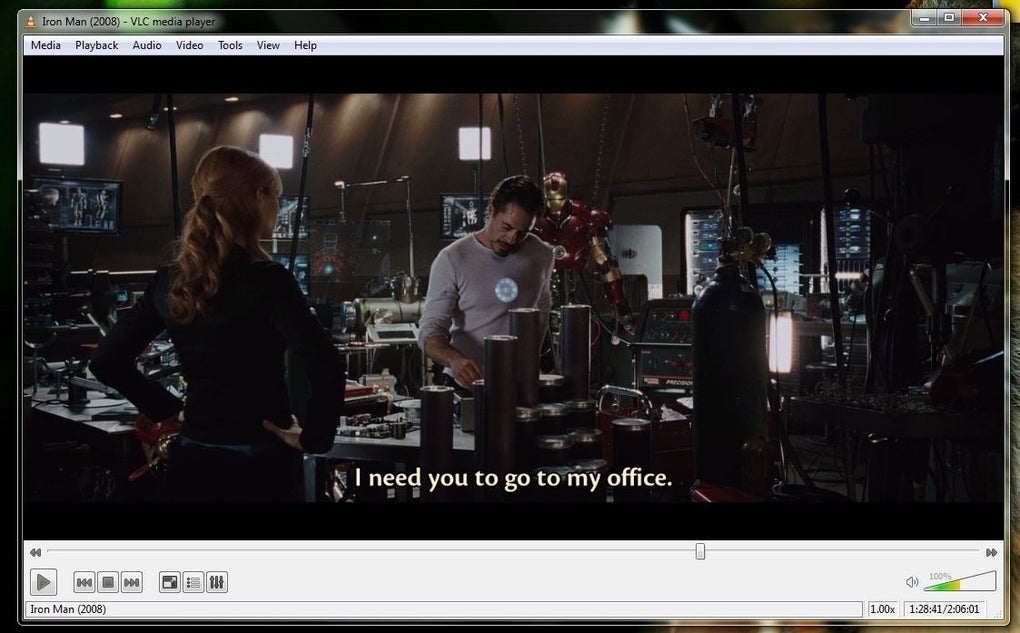
VLC features a simple, utilitarian interface that emphasizes functionality over design. While it may appear dated compared to modern media centers, its clean layout ensures essential controls—such as playback, volume, and timeline navigation—are easy to access. Customization options, including downloadable skins and toolbar configurations, allow users to tailor the interface to their needs, although some elements remain visually basic by current UI standards.
Advanced features for power users
Beyond basic playback, VLC includes advanced features such as an audio equalizer, spatializer, and subtitle synchronization tools. Users can adjust audio frequencies, apply effects, and manually correct subtitle timing for more refined control. However, tools like transcoding and stream setup are geared more toward advanced users; the functionality is powerful, but the interface and workflows can be complex for beginners.
Streaming and format conversion
VLC supports network streaming via protocols such as HTTP, RTSP, and HLS, enabling playback of online content or local media streamed over a network. Users can also play direct stream URLs from platforms like YouTube or Twitch, though the player functions solely as a client—not as a streaming broadcaster.
In addition, the playback program offers real-time transcoding, allowing users to convert media formats within the player itself. While the feature is comprehensive, it requires familiarity with technical settings such as encoding parameters and output profiles.
Performance and resource efficiency
Thanks to support for hardware acceleration technologies (e.g., DirectX, VAAPI, VDPAU), VLC performs efficiently even on lower-end systems. This is especially useful for smooth playback of high-resolution content, including 4K and 8K video, when hardware acceleration is properly enabled.
Open-source development and community support
VLC is developed and maintained by the non-profit VideoLAN organization through an open-source, community-driven model. Updates are released regularly, providing new features, performance improvements, and security patches. Development is transparent, and user feedback plays a central role in shaping the player’s ongoing evolution.
Limitations compared to media centers
While VLC excels at media playback, it lacks features found in full-fledged media center applications like Plex or Kodi—such as metadata scraping and content artwork. Its focus remains on versatile playback and core functionality, rather than media cataloging or ecosystem integration.
Pros
- Open-source
- Regularly updated
- Supports lots of media formats
- Hardware acceleration
Cons
- Basic user interface
- Limited on media cataloging