

Comprehensive system audit and profile tool
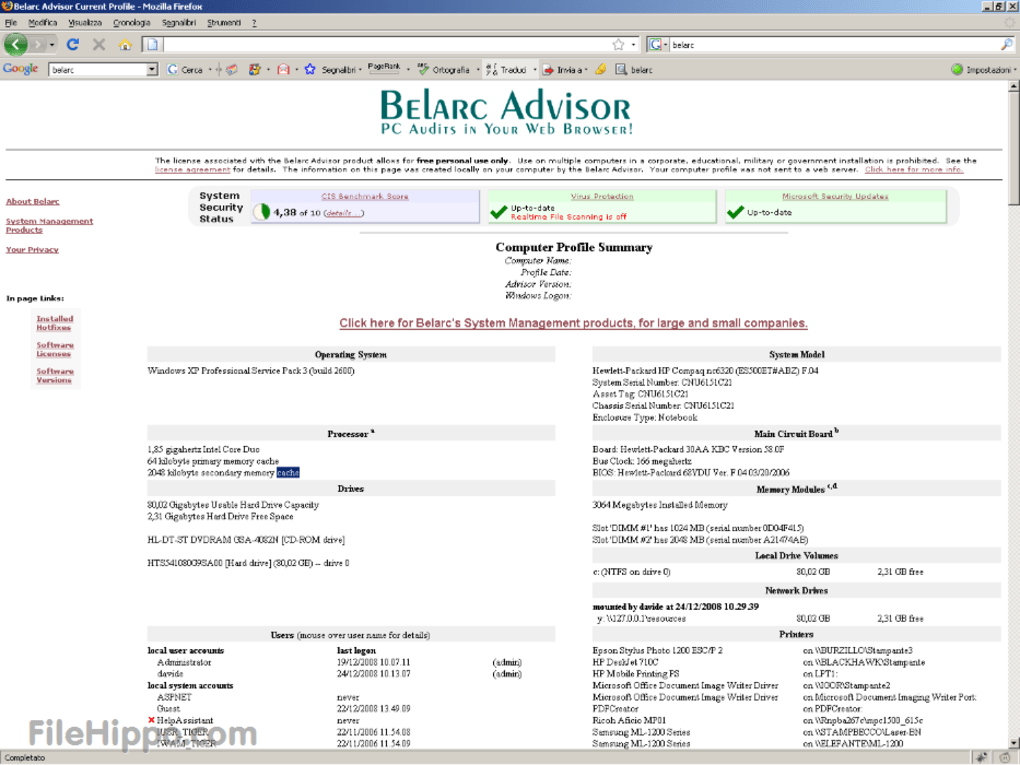
Belarc Advisor is a free system information and auditing tool designed for Windows users. It provides a detailed analysis of a computer’s hardware, installed software, security updates, and license keys. The program helps users understand their system’s current configuration without requiring technical expertise or external diagnostics.
In addition to listing installed components, Belarc Advisor generates a secure local web page that summarizes system details for personal review. The software does not send any data to external servers, ensuring user privacy. It is ideal for home users who need a reliable and accurate overview of their computer’s specifications and security status.
Belarc Advisor scans and compiles a complete inventory of your system’s hardware, software, and security updates. It identifies missing patches, unlicensed software, and outdated drivers, allowing users to manage their systems more effectively. Reports are presented in an easy-to-read HTML format that opens directly in the default web browser. However, its outdated interface design feels neglected, and its Windows-only compatibility significantly limits accessibility for users on other operating systems.
Detailed system insight and reliable reporting
The tool’s privacy-first design ensures all data remains local to the user’s computer. Unlike cloud-based system analyzers, it never uploads information, making it a secure option for users who value confidentiality. It’s particularly useful for troubleshooting, upgrading hardware, or verifying software installations. However, the lack of real-time monitoring features and limited customization options make it feel restrictive, especially for users seeking more flexibility and proactive system management.
While it is a strong standalone utility, alternatives such as Speccy, HWiNFO, and CPU-Z provide similar system diagnostics with different interfaces and levels of detail. However, this program stands out for its software licensing audit capabilities and user-friendly presentation, which make it a preferred choice for many Windows users. Its consistent accuracy and lightweight performance further enhance its reputation as a dependable system information tool.
Pros
- Detailed hardware and software reports
- Privacy-focused; data stored locally
- Easy-to-read HTML summaries
- Detects missing updates and licenses
Cons
- Outdated interface design
- Windows-only compatibility
- No real-time monitoring features
- Limited customization options







