
Portable Windows USB tool
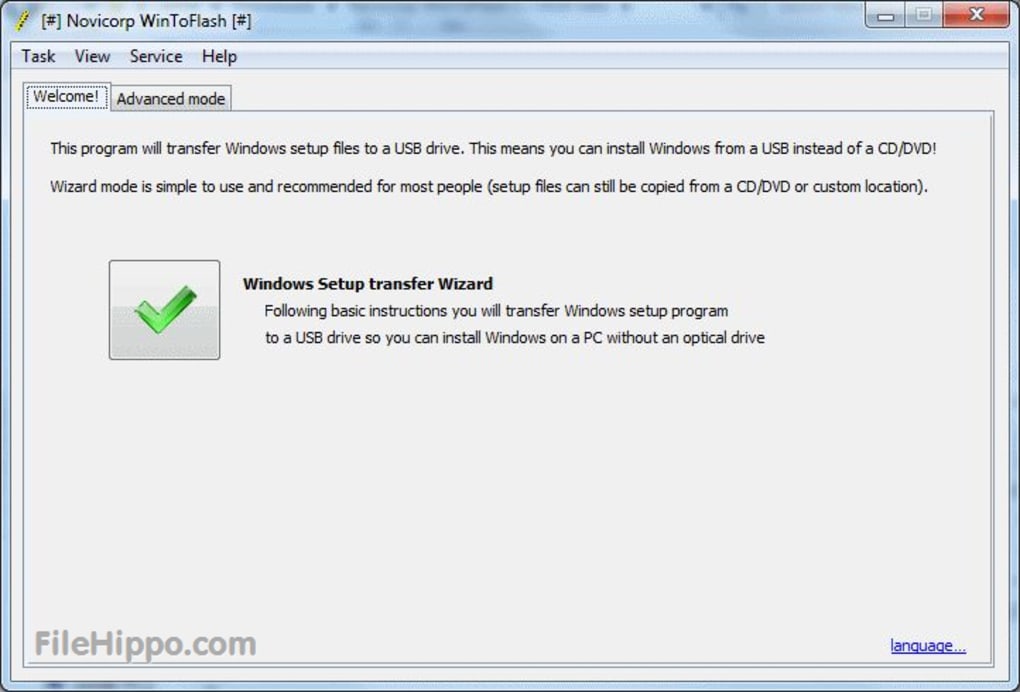
WinToFlash, developed by Novicorp, is a free utility designed to create bootable USB drives for installing Windows. It transfers Windows installation files from CDs, DVDs, or ISO images onto a USB drive, allowing you to set up or repair their operating system without an optical drive.
WinToFlash supports various Windows versions, from XP to modern releases, and includes compatibility with BIOS and UEFI boot modes. It offers both a simple step-by-step wizard for beginners and an advanced mode for experienced users. It provides a practical solution for those needing portable Windows installation media for laptops, netbooks, and desktop computers.
WinToFlash simplifies the process of creating a bootable USB drive, making it easier to install Windows on devices that lack a CD/DVD drive. It supports different file systems such as FAT32, NTFS, and exFAT, supporting compatibility with legacy and modern boot modes. The wizard mode guides you through each step, while the advanced mode provides more customization, including partitioning options and bootloader configurations.
Your system rescue
It can generate multiboot USB drives, allowing multiple operating system installers to be stored on a single device. It also includes support for Windows To Go, enabling you to run Windows directly from a USB drive. It provides an option to create DOS bootable USB drives, which can be useful for running system diagnostics, firmware updates, or restoring legacy computers.
The free version contains advertisements, and some advanced features are only available in the paid version. Additionally, while it supports multiple boot modes, certain hardware configurations sometimes encounter compatibility issues. The interface, though functional, appears outdated compared to newer alternatives, like Rufus or Ventoy. It's a practical tool for creating bootable USB drives, particularly for users needing a simple Windows installation solution.
Pros
- Supports multiple Windows versions and boot modes
- Wizard and advanced modes for different user levels
- Creates multiboot and Windows To Go USB drives
Cons
- Outdated interface
- Some hardware compatibility issues







